Creating a cozy and functional home office space can make a big difference in your daily productivity and overall well-being. Whether you work remotely full-time or just need a dedicated spot for occasional tasks, designing an environment that feels inviting while supporting your workflow is essential. Here are some practical tips to help you set up a home office that works for you.
Choose the Right Location
Start by selecting a spot in your home that suits your work style and needs. Ideally, this space should be:
– Quiet and private, so you can focus without distractions.
– Near natural light to improve mood and reduce eye strain.
– Away from high-traffic areas to minimize noise.
If space is limited, try to find a corner or nook that can be dedicated solely to work.
Prioritize Comfortable and Supportive Furniture
Your workspace furniture is crucial for both comfort and productivity.
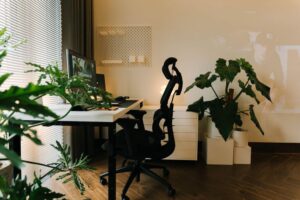
– Ergonomic chair: Invest in a chair with lumbar support and adjustable height to maintain good posture throughout the day.
– Desk size: Choose a desk that fits your essential devices and gives you enough room for writing or organizing documents.
– Standing options: Consider a sit-stand desk or an adjustable converter to vary your position and reduce fatigue.
Comfortable furniture prevents physical strain and helps you work longer with less discomfort.
Optimize Lighting for Comfort and Efficiency
Good lighting is essential in a home office. It not only reduces eye strain but also keeps you alert and focused.
– Natural light: Position your desk near a window to take advantage of daylight.
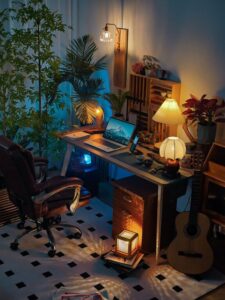
– Task lighting: Use a desk lamp with adjustable brightness and color temperature for detailed work.
– Avoid glare: Place screens perpendicular to windows and use blinds or curtains to control brightness.
Layered lighting creates a balanced space that feels bright but not harsh.
Organize Your Workspace
A tidy, well-organized workspace encourages productivity and helps eliminate distractions.
– Cable management: Use clips, sleeves, or under-desk trays to keep cords out of sight.
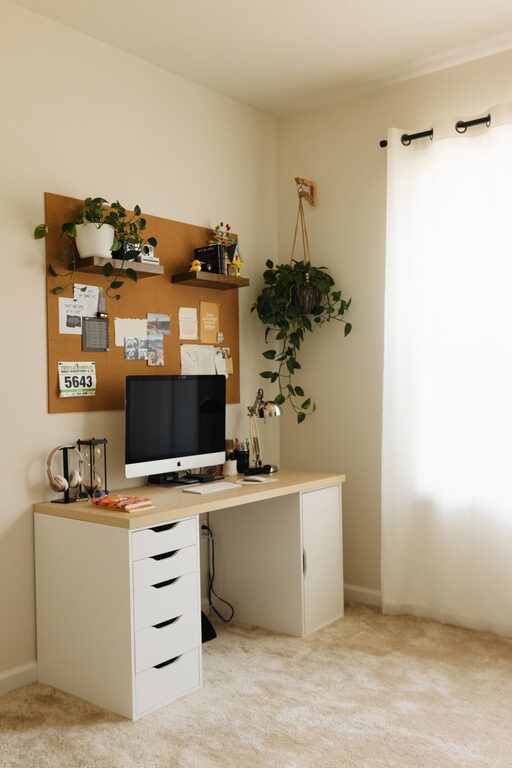
– Storage solutions: Use shelves, filing cabinets, or desk organizers for paperwork and supplies.
– Minimal clutter: Keep only essential items on your desk to maintain focus.
Regularly declutter and reorganize your space to maintain a calm, efficient environment.
Personalize Your Office to Boost Comfort
Adding personal touches can make your home office more inviting and motivating.
– Artwork and décor: Choose pieces that inspire or calm you.
– Plants: Indoor plants improve air quality and add a refreshing natural element.
– Textiles: Use cushions, rugs, or curtains to soften the space and add warmth.
Personalization makes your workspace feel like a space you want to spend time in.
Set Boundaries to Maintain Work-Life Balance
One of the biggest challenges of working from home is separating work from personal life.
– Dedicated workspace: Keep work materials in your office area only.
– Work hours: Establish a routine with clear starting and stopping times.
– Signal boundaries: Use a “do not disturb” sign or headphones during focused work periods.
Setting boundaries helps improve focus during work and encourages proper rest after hours.
Use Technology Wisely
Equip your home office with the technology you need to work efficiently.
– Reliable internet: A strong connection is vital for video calls and cloud-based work.
– Quality peripherals: Invest in a good keyboard, mouse, and monitor for comfort and efficiency.
– Backup solutions: Use external drives or cloud storage to secure your important files.
Technology should support your workflow, not complicate it.
Maintain Good Air Quality and Temperature
A comfortable environment supports mental clarity and well-being.
– Ventilation: Keep the air fresh by opening windows or using an air purifier.
– Temperature control: Adjust heating or cooling based on your needs.
– Humidity: Use a humidifier in dry climates to prevent discomfort.
Comfortable air quality keeps you alert and healthy during long periods of work.
Incorporate Zones for Different Tasks
If space allows, create designated zones for various activities.
– Work zone: For focused computer or paperwork tasks.
– Creative zone: For brainstorming or planning with tools like whiteboards or pinboards.
– Break zone: A comfortable chair or small space to step away and relax briefly.
Defined zones encourage better focus by matching the environment to different work modes.
—
In conclusion, designing a cozy and functional home office is about balancing comfort with productivity. Thoughtful choices in location, furniture, lighting, organization, and personalization help create a space where you can work efficiently and feel good doing it. With a little planning and creativity, your home office can become your favorite room in the house.